Computation for Linguists
LaTeX, Day 3
2025-09-03
Review
- What did we talk about in Friday’s class?
Finishing up Citations
Additional Features: Citations
Citations in LaTeX will refer to a .bib file
Let’s create one in our “301-LaTeX-practice” project folder
Call this .bib file “refs.bib”
Additional Features: Your First .bib
@article{smith2017,
    author = {Smith, John},
    title = {Some paper},
    year = {2017},
    journal = {Journal of Research},
    volume = {2},
    number = {1},
    pages = {1--69}
}

@book{knuth1986,
  author    = "Donald E. Knuth",
  title     = "The {TeX} Book",
  year      = "1986",
  publisher = "Addison-Wesley Professional",
  address   = "Massachusetts"
}
Additional Features: Citations
With these two references now in the system, let’s practice citing them.
Edit your preamble with the following text, after the documentclass command.
\documentclass{article}
\usepackage{natbib}
\bibliographystyle{apalike}
\begin{document}
Additional Features: Citations
- End your document as follows:
\bibliography{refs}
\end{document}
Additional Features: Citations
\documentclass{article}
\usepackage{natbib}
\bibliographystyle{apalike}

\begin{document}
\title{My First Document}
\author{My Name}
\date{December 6, 2017}
\maketitle

\section{Introduction}
 This is the introduction.\cite{smith2017}
\section{Methods}
\subsection{Stage 1}
The first part of the methods.\nocite{knuth1986}
 \subsection{Stage 2}
The second part of the methods.\cite[p. 215]{smith2017}
 \section{Results}
 Here are my results \citep{knuth1986,smith2017}.

\bibliography{refs}
\end{document}- Copy the above code and run it in your project tex file.
To Do at Home: Zotero
A much more user-friendly reference platform is Zotero.
Click here to sign up for the platform or log into your account.
Add at least one reference if you do not have one already.
Select all of the references to export
Click the “upwards arrow” icon
You now have a .bib file!
LaTeX Packages
Allow you to use LaTeX in ways beyond its base features
“Declared” in the preamble with the command
\usepackage{packagename}Can conflict with each other!
For this reason, the order in which you install the packages actually does matter.
- But, why?
Loading a Package
- Copy and paste the following in your “301-LaTeX-practice” project tex file.
- The
lipsumpackage generates placeholder text.
Loading a Package that’s not in Overleaf
- Let’s try a different style for our “lorem ipsum” text. What happens when you load the following code?
Loading a Package that’s not in Overleaf
- Download duckuments.sty.
- Upload this file into your project folder in Overleaf.
- Now run the same code as before.
- What happens? What does this tell you about installing packages not automatically built into Overleaf?
Packages: Options & Optional Arguments
- We’ll be loading up a useful list package:
enumitem - Why not just use enumerate / itemize?
itemize= black dots, fixed indentation, spacingenumerate= 1., 2., 3. … only- changing label style (a., i., A., etc.) or margins requires redefining macros, which isn’t user-friendly
- vertical spacing is often too wide for handouts/homework.
- TLDR - your examples and lists look more professional!
Packages: Options & Optional Arguments
- Let’s load up
enumitemto see how it works - Check out the customizations - can you modify the code so that the list starts with (d)?
\documentclass{article}
\usepackage{enumitem} % no options

\begin{document}

% Default enumerate
\begin{enumerate}
  \item Alpha
  \item Beta
\end{enumerate}

% Customized enumerate (full label syntax)
\begin{enumerate}[label=(\alph*), start=3, nosep, leftmargin=*]
  \item starts at (c)
  \item then (d)
\end{enumerate}

\end{document}
Packages: Options & Optional Arguments
\begin{enumerate}[label=(\alph*), start=3, nosep, leftmargin=*]- We’d have to do this for all of our lists, if we wanted to modify them accordingly.
- Is there any way we can make this less clunky?
- Yes! Invoke some options in your package declaration.
Baseline: no package options
- Let’s add the option
shortlabelsto the package.
\documentclass{article}
\usepackage[shortlabels]{enumitem}

\begin{document}

% Same effect, shorter to type:
\begin{enumerate}[(a)] % shorthand for label=(\alph*)
  \item alpha
  \item beta
\end{enumerate}

% Start at (c) with shorthand:
\begin{enumerate}[(a), start=3, nosep, leftmargin=*]
  \item starts at (c)
  \item then (d)
\end{enumerate}

% Other shorthands:
\begin{enumerate}[A.]   % -> A., B., C.
  \item First
  \item Second
\end{enumerate}

\begin{enumerate}[i.]   % -> i., ii., iii.
  \item One
  \item Two
\end{enumerate}
\end{document}
Funny Symbols
- We’re linguists, so of course we work with lots of languages and funny scripts.
- For instance, what do we do if we’re citing French data?
- Or German?
- Note: modifying diacritics work for any symbol:
Funny Symbols: IPA
- We’re going to use this idea with IPA
- But we’ve of course got to load a package for this:
tipa- To see full instructions, download the TIPA manual
- Let’s load it up.
Funny Symbols: IPA
There are two ways you can use TIPA:
- With individual characters:
- Within a
\textipaenvironment
To find the symbols, check out the TIPA manual
IPA Activity
- In LaTeX, type out “your first name” using the TIPA package.
Funny Symbols: IPA & Other Scripts
- But what about Japanese? It’s easier than you think…
- What happens when you run this code?
Funny Symbols: XeLaTeX
- Click “Menu” –> “Compiler” –> “XeLaTeX”
Funny Symbols: XeLaTeX and IPA
- Wait a minute… does this mean that we can use XeLaTeX with IPA symbols? See for yourself…
Phonological Rules
- In Linguistics, we invoke sounds in talking about how they are used in language
- And frequently, this means talking about phonological rules, which looks like:
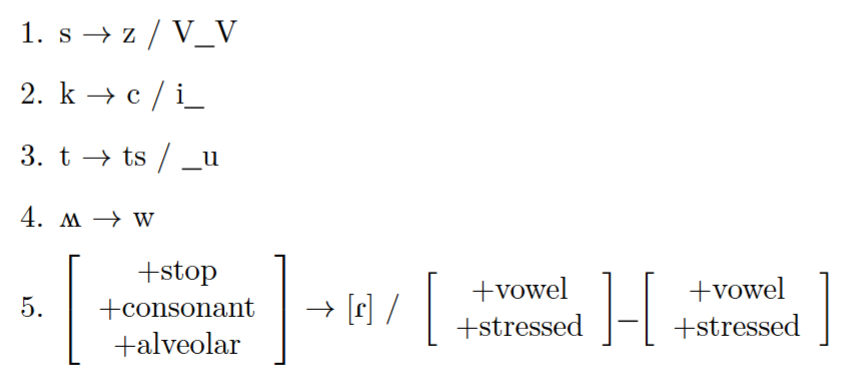
Phonological Rules in LaTeX
- To create phonological rules we’ll be using the
phonrulepackage
\documentclass{article}
\usepackage{phonrule} #phonological rule package
\usepackage{tipa}
\begin{document}
\begin{enumerate}
\item \phonb{s}{z}{V}{V} (\textbackslash phonb)
\item \phonl{k}{c}{i} (\textbackslash phonl)
\item \phonr{t}{ts}{u} (\textbackslash phonr)
\item \phon{\textturnw}{w} (\textbackslash phon)
\item \phonb{\phonfeat{+stop \\ +consonant \\ +alveolar}}{[\textfishhookr]}{ \phonfeat{+vowel \\ +stressed}}{\phonfeat{+vowel \\ +stressed}}
\end{enumerate}
\end{document}Phonology Activity
- Now it’s your turn! Let’s analyze this small sample of invented data together, and then render a phonological rule in LaTeX that describes the alternation.
| 1sg | 2sg | 3sg |
|---|---|---|
| pagis | pagat | pak |
| tabis | tabat | tap |
| zobis | zobat | zop |
| bagis | bagat | bag |
| zudis | zudat | zud |
An Aside: Doing Optimality Theory (OT) in LaTeX
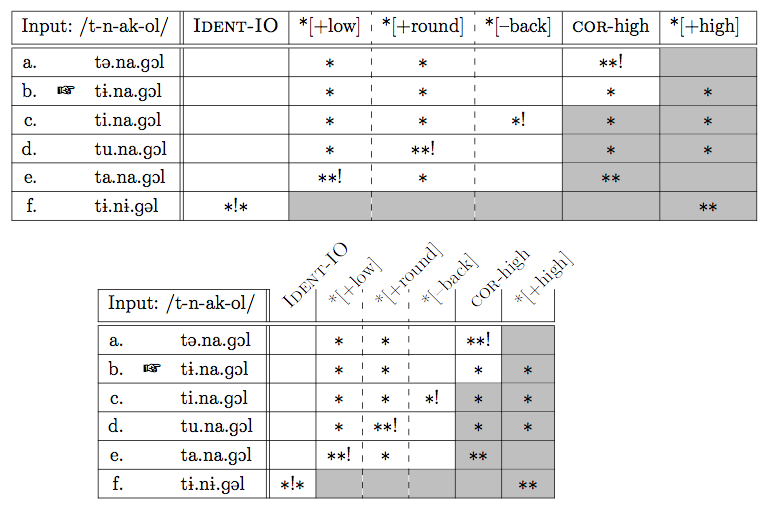
OT Tableaux
OT Tableaux
\documentclass{article}
\usepackage{tipa} %for ipa
\usepackage[table]{xcolor} %for shading*
\usepackage{pifont} %for pointing hand
\usepackage{arydshln} %for dashed lines
\usepackage{rotating} %for angled text
\begin{document}
\begin{table}[h]
\centering
\renewcommand{\arraystretch}{1.2}
\setlength{\tabcolsep}{6pt}
\begin{tabular}{|rrl||*{3}{c|}}
\hline
\multicolumn{3}{|c||}{\textipa{/tup/}} &
\rotatebox{45}{NoCoda} &
\rotatebox{45}{Dep-V} &
\rotatebox{45}{Max-C} \\
\hline\hline
a. & & \textipa{tup} & $\ast$! & \cellcolor{lightgray} & \cellcolor{lightgray} \\
\hline
b. & \ding{43} & \textipa{tu} & & & \cellcolor{lightgray}$\ast$ \\
\hline
c. & & \textipa{tupi} & & $\ast$! & \cellcolor{lightgray} \\
\hline
\end{tabular}
\renewcommand{\arraystretch}{1}
\end{table}
\end{document}