Computation for Linguists
SpaCy & Semantic Mappings
Dr. Andrew M. Byrd
2025-11-05
Review
- What did you learn last time?
Recap from Last Time
Recap from Last Time
import spacy
import pandas as pd

# Load English model
nlp = spacy.load("en_core_web_sm")

text = "Dr. Byrd's students can't wait to analyze PIE roots!"
doc = nlp(text)

# Create list of dicts, one per token
data = []
for t in doc:
    data.append({
        "text": t.text,
        "lemma": t.lemma_,
        "POS": t.pos_,
        "tag": t.tag_,
        "stop": t.is_stop,
        "is_punct": t.is_punct
    })

# Make DataFrame
df = pd.DataFrame(data)
print(df)
Recap from Last Time
Recap from Last Time
Recap from Last Time
Activity: Alice in Wonderland
- For this activity, you’ll be using
alice.txt. Make sure it’s in the same folder as this.qmdfile. - Filter out stopwords, punctuation, whitespace, and “like numbers”.
- Build a
pd.DataFrame, and count how many times each word occurs in the story. - Plot the top 20.
Using spaCy for Syntactic Processing
Sentence Segmentation
import spacy
import pandas as pd

# Load English model
nlp = spacy.load("en_core_web_sm")

text2 = "President Pitzer, Mr. Vice President, Governor Connally, ladies and gentlemen: I am delighted to be here today. We meet in an hour of change and challenge."
doc2 = nlp(text2)
[s.text for s in doc2.sents]
Dependency Parse (head, relation)
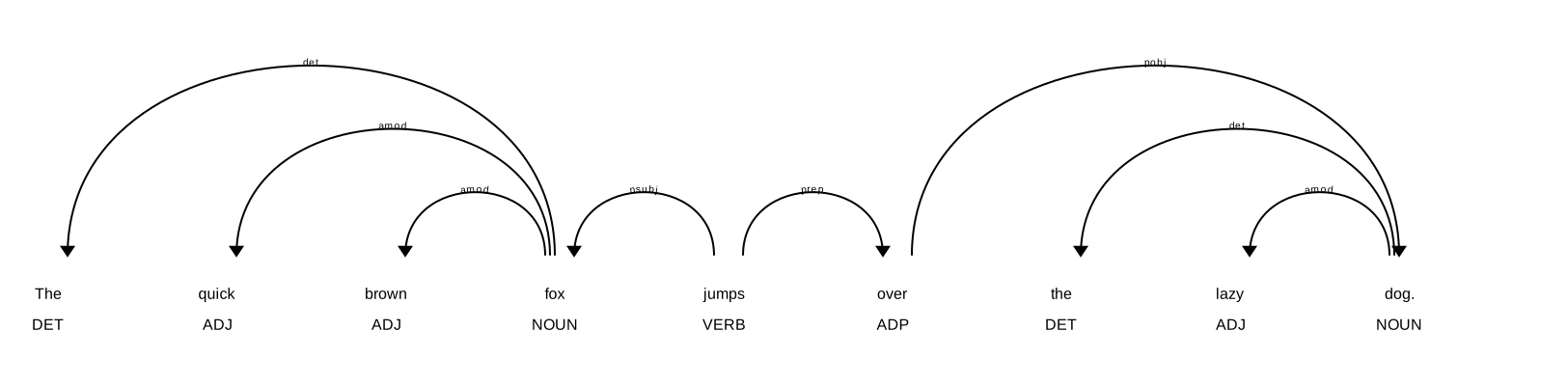
Visualize Dependencies (displaCy)
Visualize Dependencies (displaCy)
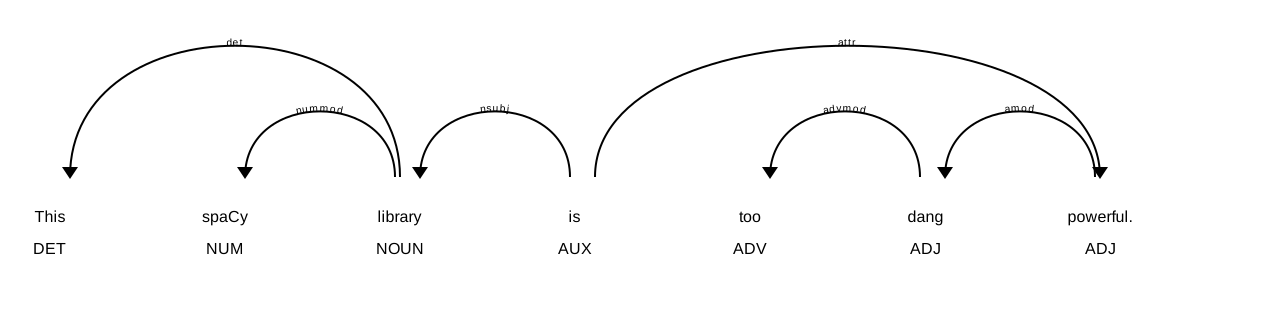
Activity: Dependencies
- Visualize the following sentence using
displaCy
Visualize Dependencies (displaCy)
Extracting Verbs + Direct Objects
- We can also identify specific syntactic relations within our sentences, such as all nouns that are direct objects.
- by using the
.childrenattribute, we identify all immediate syntactic dependents of a token
- by using the
Rule-Based Matching (verbs of violence, e.g.)
- And we can also filter out for specific groups of words that we define beforehand
import spacy

nlp = spacy.load("en_core_web_sm")

# Step 1: Our manual list of violent verbs
verbs_of_violence = ["attack", "hit", "kick", "strike", "punch", "assault", "kill", "hurt"]

# Step 2: Process a sentence
doc = nlp("They punched, kicked, and attacked the intruder before fleeing.")

# Step 3: Find any tokens whose lemma is in our list
matches = [(t.text, t.lemma_) for t in doc if t.lemma_ in verbs_of_violence]

print(matches)
Activity Together: Narrowing Down Words by Function & Semantic Class
- Let’s copy the following list and sentence.
Activity Together
How might we narrow down these words by function & semantic class?
- Process the text using
nlp() - Define a list:
obj_dep = ["dobj", "pobj", "obj"]
- Run a for loop and append any words that are in
obj_depsto a listobjects - Run a list comprehension defining
matches, as we did above:
Activity Together
import spacy
nlp = spacy.load("en_core_web_sm")

# Step 1: Define your semantic group
dog_words = ["dog", "hound", "terrier", "poodle", "retriever", "shepherd", "beagle", "collie"]

# Step 2: Sample text
text = "The farmer owned three terriers, but the poodle ran away with a collie."

# Step 3: Process the text
doc = nlp(text)

# Step 4: Collect all nouns that are objects of verbs or prepositions

obj_deps = ["dobj", "pobj", "obj"]
objects = []

for tok in doc:
    if tok.dep_ in obj_deps:
        objects.append(tok)

# Step 5: Keep only those whose lemma is in our semantic group
matches = [(t.text, t.lemma_) for t in objects if t.lemma_.lower() in dog_words]

print(matches)
WordNet
Semantic Analysis
- In the previous code block we predefined
verbs_of_violenceanddog_words - But what if we were able to access a library that already contained all of these?
- Or perhaps all possible word groups?
WordNet
- We can connect to WordNet, which is a lexical database
- Developed at Princeton University
- Organizes English words into synsets (sets of cognitive synonyms)
- Developed at Princeton University
WordNet
- Note: WordNet is no longer being developed, but the database and tools are still available to use
- also note: WordNet is much more easily accessed using a different NLP library NLTK
WordNet
- Captures relationships among words:
- Synonyms: good ↔︎ nice
- Antonyms: hot ↔︎ cold
- Hypernyms: dog → animal
- Hyponyms: dog → poodle
- Meronyms: car → wheel
- Entailments: snore → sleep
- Synonyms: good ↔︎ nice
Setting up WordNet
Initialize spaCy + WordNet bridge
Testing the synset
- We can look at a word to see how many synsets are generated:
doc = nlp("The dog chased the cat.")
tok = doc[1]

synsets = tok._.wordnet.synsets()   # list of NLTK-style Synset objects

print(f"These are the different meanings the word '{tok}' has:")
count = 0

for i in synsets:
  print(f"{count}: ", i)
count += 1- Let’s change the index to [2] & [4] to see what it gives us.
Definitions
- We can print up definitions for each of the synsets:
doc = nlp("The dog chased the cat.")
tok = doc[2]

for s in tok._.wordnet.synsets():
print(s, "→", s.definition())- Let’s change the index to [2] & [4] to see what it gives us.
Examples
- There are often example sentences that you can print up
Lemmas
- And you can identify other lemmas within a synset for comparison
Filter synsets by POS
- And we can filter synsets by POS:
- “N” = nouns;“V” = verbs; “A” = adjectives; “R” = adverbs
import spacy
from nltk.corpus import wordnet as wn
from nltk.corpus.reader.wordnet import NOUN, VERB, ADJ, ADV

# Load spaCy
nlp = spacy.load("en_core_web_sm")

# Sentence with both noun and verb "bear"
text = "The bears bear their burdens bravely."
doc = nlp(text)

# Map spaCy POS tags to WordNet POS tags -- this is a **function**, we'll get to these soon
def get_wordnet_pos(spacy_pos):
    if spacy_pos.startswith("N"):
        return NOUN
    elif spacy_pos.startswith("V"):
        return VERB
    elif spacy_pos.startswith("J"):
        return ADJ
    elif spacy_pos.startswith("R"):
        return ADV
    return None

# Loop through tokens and look up WordNet entries
for token in doc:
    wn_pos = get_wordnet_pos(token.tag_)
    lemma = token.lemma_.lower()

    if wn_pos and not token.is_stop and not token.is_punct:
        synsets = wn.synsets(lemma, pos=wn_pos)
        print(f"\n{token.text.upper()} ({token.pos_}) → lemma: {lemma}")
        for s in synsets[:3]:  # show just the first 3 senses
            print(f"  - {s.definition()}  [examples: {s.examples()}]")
Activity: WordNet Practice
Using previous code as a model:
- Load up spaCy & the English language model;
- Create a sentence on your own to analyze (or use “The duck saw the bat near the bank.”);
- For each word in the sentence, print up the token, lemma, POS, definition, and example.