Computation for Linguists
LaTeX, Day 2
2025-08-29
Review
- What did we talk about in Wednesday’s class?
Review of Concepts
Documentclass
Preamble
Packages
Comments
Commands
Environments
Finding Additional Features
Additional Features
Load up your “example_project”. There are lots of features in this document. Scan the code, and identify how to do the following:
“Math Mode”
Changing the margins & paper size
Changing the document language
Spell check settings
Adding citations & references
Identify their type: commands or environments or something else?
Math Mode
Additional Features: Math Mode
When would you use math mode in Linguistics?
Easy Superscripts & Subscripts
Semantic Formulae
Greek Letters
Primes for intermediate projections / traces in Syntax
Additional Features: Superscripts & Subscripts in Mathmode
- Notice anything special about the mathmode text?
Additional Features:Superscripts & Subscripts in Textmode
- Textmode allows you to maintain the same style
Additional Features: Semantic Formulae
L(n, j) ∨ C(j)
- The symbol < ∨ > = disjunction (vs. conjunction)
- “Either L is true of n and j, or C is true of j, or both.”
Additional Features: Greek Letters
Remember “alpha notation” from phonology? We need a way to use these symbols.
We’ll learn in a bit how to input Greek letters outside of mathmode.
These are all lowercase – how do you think we can make them uppercase?
- Test your ideas in your tex file.
Activity: Math Mode
Return to your “301-LaTeX-practice” project. Create the following semantic notation formula in LaTeX using math mode. Refer to page 31 of Anke Himmelreich’s pdf for the commands.

Font Effects
Additional Features: Font Effects as Commands
\textit{words in italics}
\textsl{words slanted}
\textsc{words in smallcaps}
\textbf{words in bold}
\texttt{words in teletype}
\textsf{sans serif words}
\textrm{roman words}
\underline{underlined words}
\uuline{doubly underlined text}
\uwave{wavy underlined text}
\sout{crossed out text}
\xout{x'd out text}- You’ll notice that while there are line breaks in the code, there aren’t in the document. How might you add a line break between each of these lines?
Additional Features: Line Breaks
\textit{words in italics}

\par \textsl{words slanted}

or

\textit{words in italics}

\textsl{words slanted}- You can also use \\ to signal a linebreak, but it sometimes messes with spacing / document structure.
Additional Features: Other Types of Breaks
- Try these out in your “example_project”. What do they do?
Additional Features: Font Effects as Environments
\begin{bfseries}
blah blah blah
\end{bfseries}
\begin{itshape}
blah blah blah
\end{itshape}
\begin{em}
blah blah blah
\end{em}- If you have large sections of text, it may make sense to do these within an environment instead.
Additional Features: Font Sizes
{\tiny tiny words} tiny words

{\scriptsize scriptsize words} scriptsize words

{\footnotesize footnotesize words} footnotesize words

{\small small words} small words

{\normalsize normalsize words} normalsize words

{\large large words} large words

{\Large Large words} Large words

{\LARGE LARGE words} LARGE words

{\huge huge words} huge words
Additional Features: Inputting Manual spacing
Tables
Additional Features: Tables
- Let’s plug this code into your tex file.
- How do tables (tabular) work? What do you notice about the code’s structure?
- What do you think “l” means? Replace it with “c”, and “r”. What happens?
Additional Features: Tables
Additional Features: Tables
Activity: Tables
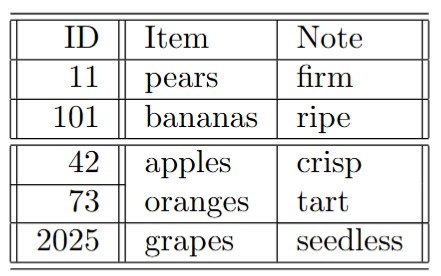
- Create the above table in LaTeX.
Citations
Additional Features: Citations
Citations in LaTeX will refer to a .bib file
Let’s create one in our “301-LaTeX-practice” project folder
Call this .bib file “refs.bib”
Additional Features: Your First .bib
@article{smith2017,
    author = {Smith, John},
    title = {Some paper},
    year = {2017},
    journal = {Journal of Research},
    volume = {2},
    number = {1},
    pages = {1--69}
}

@book{knuth1986,
  author    = "Donald E. Knuth",
  title     = "The {TeX} Book",
  year      = "1986",
  publisher = "Addison-Wesley Professional",
  address   = "Massachusetts"
}
Additional Features: Citations
With these two references now in the system, let’s practice citing them.
Edit your preamble with the following text, after the documentclass command.
\documentclass{article}
\usepackage{natbib}
\bibliographystyle{apalike}
\begin{document}
Additional Features: Citations
- End your document as follows:
\bibliography{refs}
\end{document}
Additional Features: Citations
\documentclass{article}
\usepackage{natbib}
\bibliographystyle{apalike}

\begin{document}
\title{My First Document}
\author{My Name}
\date{December 6, 2017}
\maketitle

\section{Introduction}
 This is the introduction.\cite{smith2017}
\section{Methods}
\subsection{Stage 1}
The first part of the methods.\nocite{knuth1986}
 \subsection{Stage 2}
The second part of the methods.\cite[p. 215]{smith2017}
 \section{Results}
 Here are my results.\cite{knuth1986,smith2017}

\bibliography{refs}
\end{document}- Copy the above code and run it in your project tex file.
Activity: Zotero
A much more user-friendly reference platform is Zotero.
Click here to sign up for the platform or log into your account.
Add at least one reference if you do not have one already.
Select all of the references to export
Click the “upwards arrow” icon
You now have a .bib file!
Activity Solutions
Activity: Tables Solution
Activity: Mathmode Solution
\(\forall w^{'} (wRw^{'} \rightarrow \exists e^{'} \land Ag(e^{'}, x)))_{nuclearscope}\)