Computation for Linguists
LaTeX, Day 1 — Structure, Sections, Labels, TOC
2025-08-27
Review Quiz
- What did we talk about in Monday’s class?
What’s LaTeX?
LaTeX
[ˈle͡ɪ.tʰɛk̚] (most common); also [ˈlɑ.tʰɛk̚], [lɑ.ˈtʰɛk̚], [lɑ.ˈtʰɛx]
but NOT
LaTeX
= a markup language:
adds special instructions to text to let a computer know how to display, structure or describe it
“make this a heading”
“make this italicized”
“put this into a list”
In a couple weeks we’ll be working with a second markup language, HTML.
LaTeX
Completely free to use!
Originally designed for mathematicians and computer scientists, but linguists have long recognized its usefulness.
Great for:
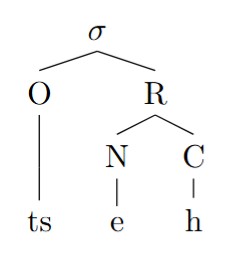
Funny scripts – IPA, non-Roman alphabets, etc.
Difficult to construct charts and illustrations, esp. syntactic trees
Knowing precisely where your texts and images will go
Typesetting Linguistics using LaTeX
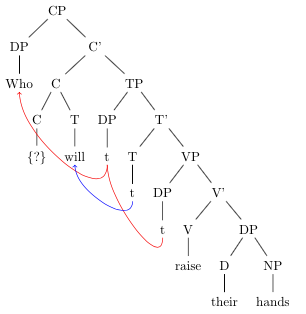
Typesetting Linguistics using LaTeX
æ̃nd͡ʒɹu bɹ̩d
Typesetting Linguistics using LaTeX
Getting set up with LaTeX
Create an account
Press the button “New Project”
Select “Example project”
Call the document “example_project”
The Basics of LaTeX
All documents need to be assigned a class. You also must “begin” and “end” that document.
- Google “LaTeX classes”. How many are there? What is the documentclass you would use for a presentation?
How LaTeX works
Everything before “\begin{document}” is called the preamble. This is where we declare the document class, load packages, and input information like the title and author.
\documentclass{article}

% Language setting
% Replace `english' with e.g. `spanish' to change the document language
\usepackage[english]{babel}

% Set page size and margins
% Replace `letterpaper' with `a4paper' for UK/EU standard size
\usepackage[letterpaper,top=2cm,bottom=2cm,left=3cm,right=3cm,marginparwidth=1.75cm]{geometry}

% Useful packages
\usepackage{amsmath}
\usepackage{graphicx}
\usepackage[colorlinks=true, allcolors=blue]{hyperref}

\title{Your Paper}
\author{You}
How LaTeX works
Notice the text preceded by “%”. These are called comments. What do you think they do?
\documentclass{article}

% Language setting
% Replace `english' with e.g. `spanish' to change the document language
\usepackage[english]{babel}

% Set page size and margins
% Replace `letterpaper' with `a4paper' for UK/EU standard size
\usepackage[letterpaper,top=2cm,bottom=2cm,left=3cm,right=3cm,marginparwidth=1.75cm]{geometry}

% Useful packages
\usepackage{amsmath}
\usepackage{graphicx}
\usepackage[colorlinks=true, allcolors=blue]{hyperref}

\title{Your Paper}
\author{You}
Activity
Return to “Home” in Overleaf.
Create a new project, called “301-LaTeX-practice”
Now edit the file main.tex.
\documentclass{article}← sets document type\author{your name};\date{\today}- Make sure
\begin{document}and\end{document}are in your file. Immediately after\begin{document}, add\maketitle. - Add Hello world! between those sections
- Press “Recompile”. What happens?
Activity, Part 2
Within main.tex, edit the document as follows:
First, change
\documentclass{article}to\documentclass{article.and then “Recompile”. What happens?Change
\date{\today}to\date{today}and then “Recompile”. What happens?Get rid of
\end{document}and then “Recompile”. What happens?Change Hello world! to Hello world? What happens?
Commands
Things that begin with a “\” are called commands.
These can have no argument (they’re avalent, if you will), like “\today”.
Many require arguments (like intransitives, transitives, etc.), like:
\documentclass{}, \author{}, and \date{}- One of the most common reason for code to break in LaTeX is if a bracket isn’t closed, so always be on the lookout for that!
Commands
Some commands even allow for optional arguments (options), which are place immediately before the command inside square brackets:
\documentclass[option1,option2]{article}Visit this site to see what types of options documentclasses can have. Modify your main.tex with these options to experiment.
- Which do you think you’ll use most often?
Environments
Environments, like “document”, have a \begin and an \end.
What’s wrong with this code?
Create a new .tex file in your project, called “working_code”. Copy and paste your working document’s code into this file.
Now copy and paste this code into your main.tex doc and select “recompile”. What happens? How should you fix it?
\documentclass[a4paper,12pt]{article}
\usepackage[utf8]{inputenc}
\begin{document (Type your content here.)
\end{document}- When you’re finished, copy and paste your code from “working_code.tex” into main_tex. Press “save” / “recompile”.
Additional Features
Now return to to your “example_project”. There are lots of features in this document. Scan the code, and identify how to do the following:
Title
Abstract
Links (url, labels)
Graphics (figures)
Sections & Subsections
Identify their type: commands or environments?
Labels & URLs
Graphics
To include an image, use a figure environment.
Sections & Subsections
To create a subsection of a section, you add “sub” to the name of that section: section –> subsection; subsection –> subsubsection. How many sections deep can we go?
Table of contents
With sections, you can create a table of contents. Place this command right after \maketitle.
Final Activity
Modify “main.tex” in “301-LaTeX-practice” to have the following:
- A title, abstract.
- Sections, subsections, and a table of contents.
- A link to an outside website within a url.
- An internal label to refer to another part of your document.