Computation for Linguists
Beginning Python: For Loops
Dr. Andrew M. Byrd
2025-10-08
Review
- What did you learn last time?
Recap from Last Time
ifelifelse
Review Activity: Plural Generator
- Create a new
qmd, create a new Python block - Copy and paste the following code:
Review Activity: Plural Generator
- Write a conditional (
if,elif,else) that:- Checks whether the last character of
wordis in the list ofsibilants - If yes, create a new variable
pluralby adding “ɪz” to the word - If no, check whether it’s in the list of
voiceless.- If yes, set
pluralto the word + “s”
- If yes, set
- Otherwise, set
pluralto the word + “z”
- Checks whether the last character of
- Print the plural form.
For Loops
Back to Brontë
- How would we print up each member of this list? We could:
Back to Brontë
- But what if we don’t know how many novels there are?
- We could use
len(), which tells us the length of a string, list, etc. - Try it:
Back to Brontë
- You might think that by knowing the
len()of a list, and by creating a counter, we could get our script to print each book one by one…
char_index = 0
if char_index < len(charlotte):
    print(charlotte[char_index])
    char_index += 1
else:
????- This won’t work because
ifonly runs once – we have no way to iterate (to repeat the action over and over again)- We need another way to go about this.
if Statements vs. for Loops
ifstatements are used to control which pieces of code are run, depending on certain conditionsforloops are used to run the same block of code over and over again on items in an iterable.
Back to Brontë
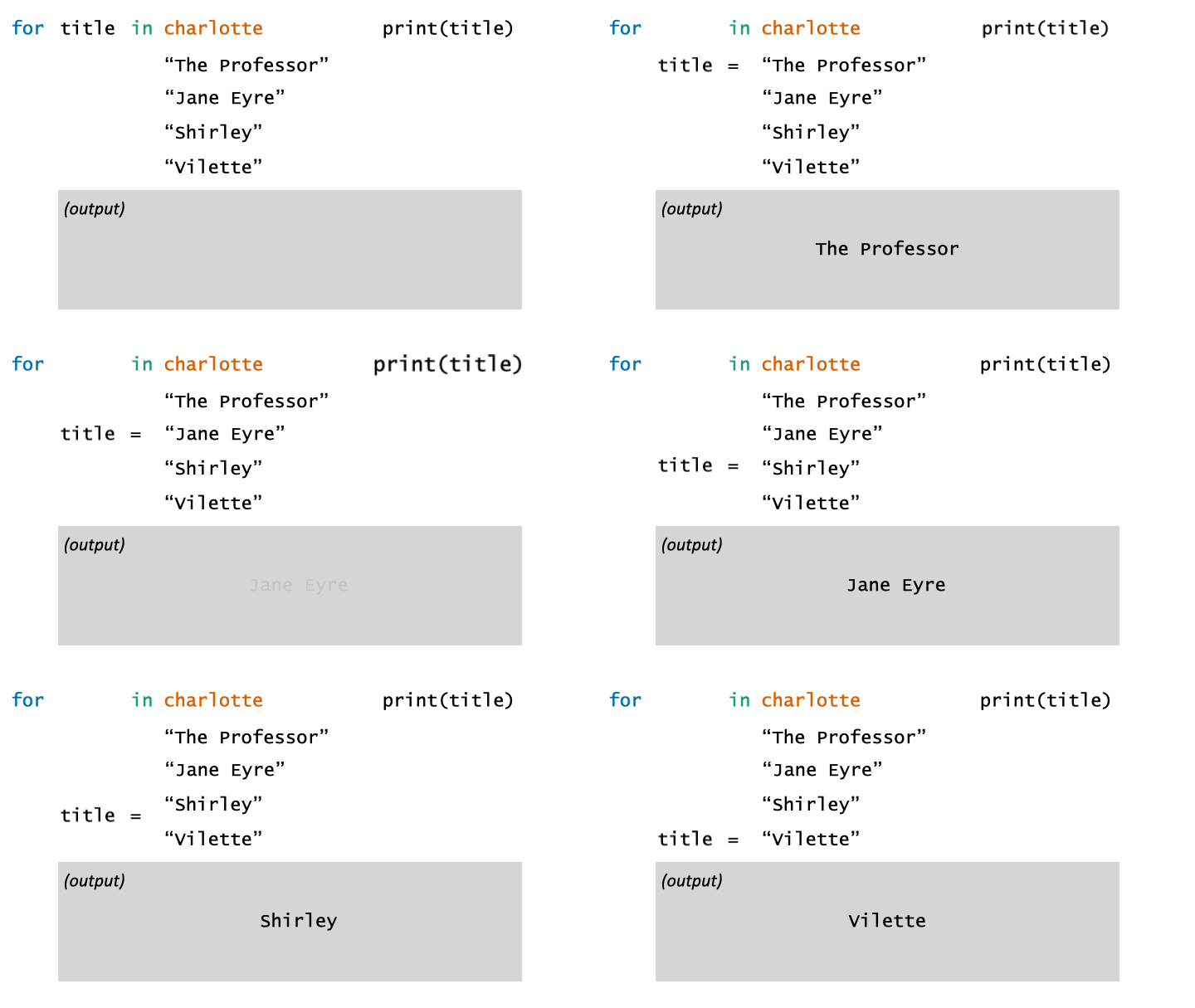
- What is this code saying?
Back to Brontë
title,bookare temporary (loop) variables
Temporary Variables
- The very last value of the loop variable (
book,title, etc.) persists after the loop is finished:
for Loops
By Dr. Josef Fruehwald
Activity: for loops
Below is a list of five important terms in Linguistics:
Your task: Write a for loop that prints out:
- the word
- the length (
len()) of each word in the list
Each printed statement should look like: “python has 6 letters.”
Cleaning Text
Cleaning Text
- Let’s now put our knowledge of conditionals and loops to work.
- This will help you as you work towards your final projects.
- We’ll need to learn how to “clean” the data.
Verifying your Python directory
- First, run the following code:
- This should tell you which directory you’re in. You should be located in your LIN_301 directory, or whichever one this
qmddoc is found in.
Downloading Using Python
- Next, we’re going to download a new book from Project Gutenberg.
- To do so, run the following code:
import urllib.request

url = "https://www.gutenberg.org/files/141/141-0.txt"  # Mansfield Park
filename = "mansfield_park.txt"

urllib.request.urlretrieve(url, filename)

print("Downloaded:", filename)- What does all of this say?
Opening up Files in Python
- Let’s now open up our file using a
with open(...)block
- What happens if you just
print(book_text[:200])?
Opening up Files in Python
- If we instead want to grab all of the lines separately, we can run:
with open("mansfield_park.txt", "r", encoding="utf-8") as f:
    book_lines = f.readlines()

len(book_lines)- Now we can grab individual lines from the book:
Cleaning Up the Book
- Do you see how each line ends in
\n? That’s indicating a line break.
- Let’s get rid of that character using the
.rstrip()method.
Cleaning Up the Book
- Some lines also start with unnecessary whitespace.
- Let’s get rid of that stuff, too, by tacking on the
.lstrip()method.
- Or we can just use
.strip(), which will handle both sides at once:
Cleaning up the Book
- Sometimes, too, we want to convert everything to either uppercase or lowercase, so strings like
"The"and"the"will count as the same word. - Methods:
lower()upper()
Activity:
- Using what you’ve learned above:
- Load up “mansfield_park.txt”
- Strip the whitespace on both sides and make all words in lower case, and save it as
mansfield_cleaned. You’ll need this list comprehension:
- To make sure it worked, run:
Activity Answers
Plural Generator
for loop Activity
Cleaning Mansfield
with open("mansfield_park.txt", "r", encoding="utf-8") as f:
    lines = f.readlines()

# Clean it: strip whitespace + lowercase
[mansfield_cleaned = line.strip().lower() for line in lines]

# Check the first 200 characters
print(mansfield_cleaned[0:10])